Power, Cords & Timers
How to set a Christmas light timer
Four kinds of timer, four different procedures, and three mistakes that account for almost every timer somebody has given up on.
Mike M. — The hands-on owner behind Iron Mako Media.
Published
This page contains affiliate links. If you buy through them we may earn a commission at no cost to you, and it never decides what we recommend. How this site is funded.
The direct answer: which procedure you follow depends on which of four kinds of timer you bought. On a mechanical dial you set the current time by rotating the dial to the arrow, then push down the pins covering the hours you want the lights on. On a digital 7-day timer you set the clock first, then program an ON time and an OFF time as a numbered event. On a photocell timer you set nothing but the run-time duration, because dusk is the trigger. On a smart plug you set a schedule in the app, ideally relative to sunset rather than to a fixed clock. Across all four, the three things people get wrong are the same: AM versus PM, failing to move the manual override back to AUTO, and never setting the clock at all.
Before you set anything: the two-minute checks
- Confirm the timer is rated for what you are plugging in. A weatherproof outdoor unit rated 15 amps covers any LED display comfortably. Check the rating on the body, not the box.
- Confirm it is an outdoor unit. An indoor timer in an outdoor receptacle is the same mistake as an indoor extension cord, and the housing is the whole difference.
- Plug it into a GFCI-protected receptacle and press test and reset once before you program anything. A timer is the wrong place to discover a GFCI fault.
- Set it up indoors first if you can. Programming a digital timer with cold fingers in the dark beside a flower bed is how people end up giving up on them.
- Decide your window before you touch the buttons. Six hours covering dusk to bedtime is the standard answer, and the reasoning is in can you leave Christmas lights on all night.
A mechanical dial timer
The simplest kind, and the one that never needs a manual once you have done it once. A mechanical timer is a 24-hour dial with segment pins around its edge, typically at 30-minute resolution, and a switch with AUTO and ON positions.
- 1
Set the current time
Rotate the outer dial until the current time of day lines up with the arrow or triangle marked on the body. The dial only turns one way on most units — do not force it backwards.
- 2
Push down the pins for the hours you want the lights on
Each pin is a segment of the day. Pushed down means on. For a 5 pm to 11 pm window, push down every pin between 5 and 11. Leave everything else up.
- 3
Set the switch to AUTO
This is the step people miss. In the ON position the timer is just an extension cord with a dial on it, and the lights stay on permanently.
- 4
Check it that evening
If it switches an hour out, the dial was set an hour out. Rotate it to correct and the pins stay as they are.
A digital 7-day timer
More control, and the one with the most places to go wrong. The programming model is the same across almost every brand: a clock, then a list of numbered ON/OFF event pairs, then a mode.
- 1
Set the clock and the day
Press CLOCK and set hours, minutes and the day of the week. Watch the AM/PM indicator — a display that reads 6:00 with no indicator is a display that could be either, and this is the single most common digital-timer error.
- 2
Open the first program slot
Press PROG or TIMER once. The screen will show something like 1 ON. That is program one, its switch-on event.
- 3
Set the ON time, then the OFF time
Enter your start time, press PROG again to move to 1 OFF, and enter the end time. A 5 pm to 11 pm window is 1 ON at 5:00 PM and 1 OFF at 11:00 PM.
- 4
Set the days the program runs
Most units cycle through presets — every day, weekdays only, weekends only, or a single day. For a Christmas display, every day is almost always what you want.
- 5
Return to AUTO and verify
Press CLOCK or MODE until the display shows AUTO rather than ON or OFF. Then press the override button once to confirm the outlet switches, and press it again to hand control back to the program.
If your display needs two schedules — lights until 11, inflatables off at 9 — use two program slots on a multi-outlet timer, or two separate timers. The comparison of the two formats is in mechanical vs digital timers.
A photocell or dusk-to-dawn timer
There is almost nothing to set, which is the appeal. The unit has a light sensor; it switches on when the ambient level drops and then either runs until dawn or runs for a selected number of hours.
- Choose the run-time setting, not true dusk-to-dawn, if your unit offers both. A 2, 4, 6 or 8-hour selector is the useful mode. True dusk-to-dawn is all-night operation by design.
- Site the sensor away from your own lights. A photocell that can see the display it controls will see its own light, decide it is daytime and switch off — then switch on again, in a loop. Point the sensor away from the house and away from a street light.
- Give it a night to settle. Switch-on will be a little earlier or later than you expect on the first evening, because the trigger is a light level and not a clock.
- Remember it tracks the season. This is the real advantage: as the days shorten through December the switch-on time moves on its own, which no fixed-clock timer does.
A smart plug
The most capable and the one that needs the most setup once. The important detail is to schedule relative to sunset rather than to a clock time.
- 1
Connect it on 2.4 GHz, before you mount it
Outdoor smart plugs are 2.4 GHz devices. Pair it indoors next to the router, confirm it works, then take it outside — pairing beside a flower bed at the edge of coverage is where this goes wrong.
- 2
Set your home location in the app
Sunset scheduling needs to know where you are. If the location is wrong, every sunset-relative schedule is wrong by the same amount all season.
- 3
Create a sunset-relative ON event
Choose sunset with an offset — 15 or 30 minutes after is about right for a display to read properly — rather than a fixed 5:00 PM. The schedule then shifts itself through the season.
- 4
Create a fixed-clock OFF event
Off should be a wall-clock time, because it is governed by your bedtime and not by the sun. 11:00 PM every night is the usual answer.
- 5
Use the second socket for a different schedule
A dual-socket outdoor plug has two independently switched outlets. Put the inflatables on the one that goes off earlier.
The three mistakes
- AM instead of PM. A display that comes on at six in the morning and goes off at midday has a 12-hour error in the clock, not a broken timer.
- Left in manual ON. Every timer has an override, and every override has to be returned to AUTO. If the lights never go off, check this before anything else.
- Clock never set. A digital timer out of the box thinks it is midnight on Monday. The programs will run — twelve or more hours out from where you wanted them.
If the timer is right and the display still misbehaves, the problem is upstream. Lights tripping the breaker and GFCI and outdoor lights cover the two faults that look like timer failures and are not.
What to buy
The products that fit the advice above, chosen by the process on our methodology page. Every specification quoted is the manufacturer’s own published figure, linked on the page.
Quick picks
| # | Product | Best for | Score | Price |
|---|---|---|---|---|
| 1 | 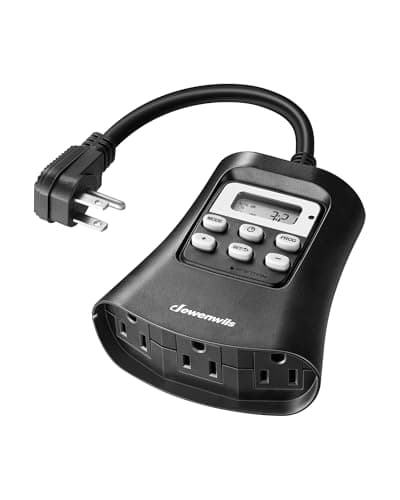 Top pickDEWENWILS Outdoor Digital Timer, 3 outlets, 15A15 A, 3 grounded outlets, 7-day | A whole display on one schedule | 9.1 | $18.99 · View on Amazon |
| 2 | 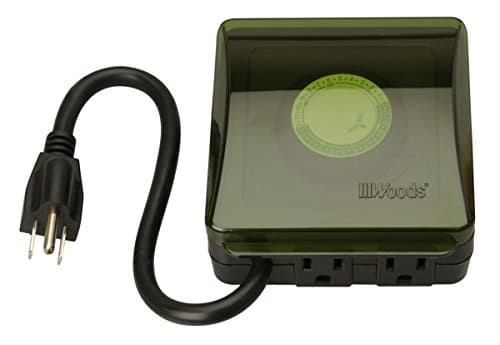 Woods Outdoor 24-Hour Mechanical TimerMechanical 24-hour dial, grounded | People who never want to read a manual | 8.0 | $20.13 · View on Amazon |
| 3 | 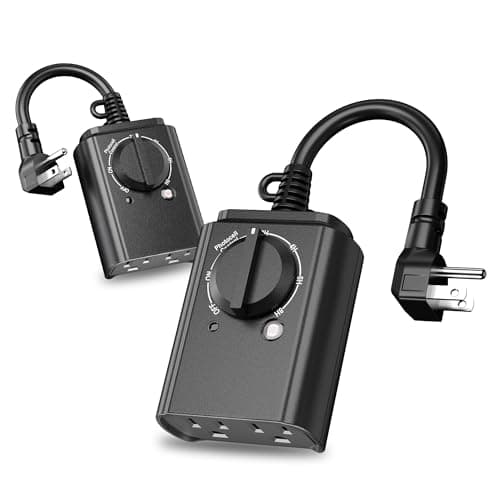 BN-LINK Outdoor Timer with Dusk-to-Dawn Sensor, 15APhotocell dusk-to-dawn, 15 A, 2 outlets | Set it once and never touch it | 8.9 | $22.79 · View on Amazon |
| 4 | 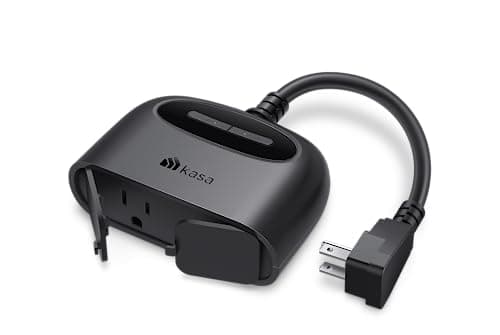 Kasa Outdoor Smart Plug (EP40)2 independent outlets, sunset offset | Sunrise/sunset scheduling and phone control | 8.8 | $22.99 · View on Amazon |
#ad We may earn a commission · Price as of October 17, 2026
Scores are our own editorial judgment from published specifications and buyer feedback, scored against the same criteria across this category. See how we pick.
Jump to a full review below: power-and-timers
Common questions
How do you set a Christmas light timer?
It depends on the type. On a mechanical dial, rotate the dial so the current time lines up with the arrow, push down the pins for the hours you want the lights on, and set the switch to AUTO. On a digital 7-day unit, set the clock and day first, then program an ON time and an OFF time as a numbered event and return the mode to AUTO. On a photocell timer you only choose a run-time duration. On a smart plug you create a sunset-relative ON event and a fixed-clock OFF event in the app.
Why won't my Christmas light timer turn the lights off?
Almost always because the override is still in the manual ON position. Every timer has one, and in that position the unit is just an extension cord with a dial on it. Return the switch or the mode to AUTO. The second most common cause is an AM/PM error in the clock, which puts the whole schedule twelve hours out.
What hours should I set my Christmas light timer to?
About six hours covering dusk to bedtime — 5 pm to 11 pm is the standard answer through December. That window covers every hour anybody actually looks at the display, and six hours is the figure the industry has settled on, with battery decorations almost universally running a fixed 6-on, 18-off cycle.
How do I reset a Christmas light timer after a power cut?
A mechanical dial timer has no backup, so it keeps its pins but loses its place in the day — rotate the dial back so the current time lines up with the arrow. A digital timer usually keeps its programs and may need the clock resetting. A smart plug recovers on its own once the network is back.
Why does my photocell timer keep switching on and off?
The sensor can see the lights it controls. It reads their light as daylight, switches off, then sees darkness and switches on again, in a loop. Reposition the unit so the sensor faces away from the display and away from any street light.
Sources
Every specification quoted on this page comes from the manufacturer’s own published information or a current retail listing, linked below. Where a figure is not published, we say so rather than estimating it.
- Amazon — DEWENWILS outdoor digital timer, 15 A, 3 grounded outlets, 7-day programmable, UL listed
- DEWENWILS — outdoor light sensor timer product specifications and programming modes
- Amazon — BN-LINK dusk-to-dawn outdoor timer with photocell, 15 A, 2 grounded outlets, ETL listed
- Amazon — Kasa Outdoor Smart Plug EP40, two independently controlled sockets, sunrise and sunset offsets, 2.4 GHz Wi-Fi
- ESFI — outdoor decoration safety tips (GFCI protection and outdoor-rated equipment)
Read next
- The best outdoor Christmas light timers
- Mechanical vs digital Christmas light timers
- Photocell vs timer vs smart plug
- Can you leave Christmas lights on all night?
- The best outdoor smart plugs for Christmas lights
- The best multi-outlet outdoor extension cords for Christmas lights
- The best battery operated Christmas lights with a timer